পৃষ্ঠাসমূহ

How to connect unreachable Networked Shared Printer in Windows 7

It is very common in a office environment to have several printer connected to a single computer acting as a Server PC. In that situation, you can add a shared printer to your workstation simply as follows:
  1. Go to Control Panel > Device and Printers > on the toolbar click 'Add Printer
  2. On the next windows, click on "Add a network, wireless or Bluetooth printer"
  3. It will search for all available shared printer on your Network and present a list of all of them.
  4. Click on the printer you want to add and click Next. It will then install the printer on your system.
Sometimes, Windows can't find the printer you are looking for. In that case follow these simple steps to add the desired printer :
1.On the 3rd step above, click on the "The printer that I want isn't listed"

2.Choose the secon option "Select a shared printer by name"

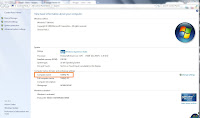
3.Now you have to find out what is the name of the PC the printer is connected to. For this, Go to that Computer, right click on "My Computer" and click 'Properties'. You will find the Computer Name there as shown on image below.
4.Then go to the "Device and Printer" from "Control Panel"
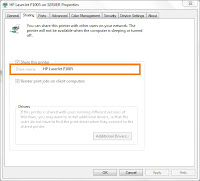
5.Right click the printer and click on "Printer properties"
6.Go the second tab "sharing" and copy the share name. Make sure the "Share this printer" is ticked on.

7. Now lets go back to 2nd step where we have to put the Computer name preceded by the printer name like this : \\Computer\Printer. For example , \\SERVER\HP LaserJet P1005.


8.Click Next and if you input it correctly, Printer Installation will occur and the printer will be added to your workstation.


Get your Canon UFRII printers work on Ubuntu 11.04

if you have a Canon UFRII (e.g iR2318/2320) printer in your network, certainly you can't get it working on your Ubuntu 11.04 as there is no default driver for it. But you can get it working following the simple steps :

First you need to download the driver from Canon website for your UFRII model. Download Driver
uncompress the zip file. Go to  32/64(according to your OS) bit driver folder and go to Debian folder and run the file "cndrvcups-common_2.20-1_i386.deb". You will see the installation is not successful. There are some dependencies missing so you can't install the driver.

You  need "cup_sys" and "gs-esp" packages before you can install the driver.
download the packages  and run those 2 files. After installation finished, run the  driver file named "cndrvcups-common_2.20-1_i386.deb" and then "cndrvcups-ufr2-uk_2.20-1_i386.deb" to successfully add all the UFRII printer driver in the driver database of Ubuntu.

You can then find the driver model when adding printer to Ubuntu. Happy Printing. 

how to make Windows 7 default when Dual Booting with Linux Mint 11

If you installed Linux Mint 11 alongside with your Windows installation, you will find that in the booting options Linux Mint 11 is set to the default OS to boot. If you want to make your windows to boot as default OS, you can do it via starup manager in Linux Mint 11.

To do this : Boot up your Linux Mint 11, click on Menu and then search for Startup-Manager and launch it. You can then chose your default Operating System (Windows 7 loader) from the drop down list.

You can also set the time before operating system loads automatically in the Timeout. There are also options for Display option but I recommend you to leave it as it.


ATI 9550 vs Nvidia 6200

I see a lot of question in internet seeking answer which one is better. My machine was running on Nvidia 6200 graphics card for long. But recently the hardware failed and I had to buy a new AGP card, and an ATI 9550 was my only available option. So I had a chance to see which product is better in real time.

Opera invents Tab Stacking!!

Opera always pioneered the web browser market and Innovation is constantly happening in the Opera browser HQ. Comes with the Opera's next version 11 is their another invention which will streamline and simplify your tab handling experience - TAB STACKING!!