![]() |
| Push the Green Button |
How to show Subtitle on Sony Bravia TV
How to connect unreachable Networked Shared Printer in Windows 7
- Go to Control Panel > Device and Printers > on the toolbar click 'Add Printer
- On the next windows, click on "Add a network, wireless or Bluetooth printer"
- It will search for all available shared printer on your Network and present a list of all of them.
- Click on the printer you want to add and click Next. It will then install the printer on your system.
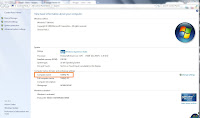
3.Now you have to find out what is the name of the PC the printer is connected to. For this, Go to that Computer, right click on "My Computer" and click 'Properties'. You will find the Computer Name there as shown on image below.
4.Then go to the "Device and Printer" from "Control Panel"

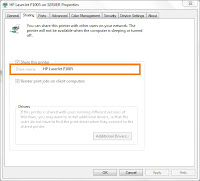
7. Now lets go back to 2nd step where we have to put the Computer name preceded by the printer name like this : \\Computer\Printer. For example , \\SERVER\HP LaserJet P1005.
Get your Canon UFRII printers work on Ubuntu 11.04
First you need to download the driver from Canon website for your UFRII model. Download Driver
uncompress the zip file. Go to 32/64(according to your OS) bit driver folder and go to Debian folder and run the file "cndrvcups-common_2.20-1_i386.deb". You will see the installation is not successful. There are some dependencies missing so you can't install the driver.
You need "cup_sys" and "gs-esp" packages before you can install the driver.
download the packages and run those 2 files. After installation finished, run the driver file named "cndrvcups-common_2.20-1_i386.deb" and then "cndrvcups-ufr2-uk_2.20-1_i386.deb" to successfully add all the UFRII printer driver in the driver database of Ubuntu.
You can then find the driver model when adding printer to Ubuntu. Happy Printing.
how to make Windows 7 default when Dual Booting with Linux Mint 11
To do this : Boot up your Linux Mint 11, click on Menu and then search for Startup-Manager and launch it. You can then chose your default Operating System (Windows 7 loader) from the drop down list.
You can also set the time before operating system loads automatically in the Timeout. There are also options for Display option but I recommend you to leave it as it.
ATI 9550 vs Nvidia 6200
Opera invents Tab Stacking!!
Uninstall Office 2010 manually
Microsoft Fix It offers an solution to completely remove Office 2010 from your system when you are unable to uninstall it in usual manner.
Just download the FIX and run. The program will take care of everything by its own. Download by clicking the Fix It Button below.
If you want to remove another version (Office 2007 or Office 2003), its also available in their site.
Luxor 5 (a disappointment for Luxor fans)
And suddenly, Luxor 5 appears. Fans cheered! But wait! The screenshot of the game seems weird! Is that the interface of Luxor 5, really? Ummm, the game got smaller too, but the feature says the game is bigger than the previous one and has many new thing. OK, lets trial...
WHOA!!!! Am I playing Luxor 5 or Luxor 1? May be the graphics designer just quit and they had to develop it without graphics . Here are some screenshots :
The game remains challenging like always. Everything is there but the story and graphics. I had complained that luxor 3 and 4 was bulky in terms of CPU consumption. even my "Call of Duty" capable machine couldn't run the game in full capacity. I think they considered it and failed to make the game lightweight, they made this.
If you just want the gameplay: Luxor 5 won't disappoint you.
Microsoft Office 2010 Activation
If you have the Office 2010 already installed (Pro/Plus/Retail) version and you need a crack to activate it, HERE IS IT.
The crack is for the VLK editions only though, but if you dont have the VLK editions, don't worry! There is simple application which will convert your existing version to VLK edition.
After you converted to VLK, run the Mini KMS Activator as administrator (right click the file and click "Run As Administrator") and chose "Activation Office 2010 VL". A DOS window will appear and do its work. Wait till it finishes. And you got your Office 2010 activated.
DOWNLOAD the Office 2010 (mini-KMS_Activator 1.3)
Kaspersky PURE 2011 with 2056 day License
Please read and follow the instruction.txt exactly found in the crack folder to successfully have your Kaspersky license for 2056 days.
The new Facebook design(Jan,2010) and ME
Apple is making $229 from $499 iPad!!
Apple claims the iPad is a device between Smartphone and Laptop. But actually what it is then? We can’t carry it on our pocket, so that's not a phone; we can’t use it like a laptop either. $499 just for browsing web, reading emails and watching videos ! Oh, it doesn’t even capable of multitasking, so no reading eBooks while listening to songs or a quick mail check :)
And have we thought something about the prices yet, Some people has? And they found out that Apple iPad (16gb) costs only $270 usd !! including hardware, R&D and manufacturing costs.
Read more about what’s the actual cost of the iPad in this post.
Resize Picture easily with ImageTuner
ImageTuner is a photo resizer software built in mind of this need. Its simple and fast. You just select the folder that the pictures are in or manually select them, chose from the pre-list of sizes and click GO and you are done.
It can also convert the format and watermark them too. Settings will give you some advanced option if you need.
Not Satisfied. Need More? Advanced Features?
Another Free program is VSO Image Resizer. Its not simple as ImageTuner but it provide more functionality and features if you need. And its free too.
How to write and see bangla in Facebook and other site
As I have a system of expressing it in my own language easily, why I sud go for Banglish. So i always write my status message in Bangla whenever possible. Many of my friends are unable to see those message and asking me to write it english which I wont do. So I decided to write a article about it.
If you are running Windows Vista or Windows 7, you dont have to do anything and you can see bangla in facebook and other sites. I will show you how to write bangla in easy way later in this article.
But if you are a Windows Xp user, then you will have to go through some simple steps to configure your Windows and browser to show bangla properly.
Step 1 : Install icomplex script.
You need to download and install icomplex script to configure your Windows to show bangla language. you can download it from here DOWNLOADyou may want to restart your pc after installing.do it.
Step 2 : Download the Banlga font
Although, all the necesarry font is included in the icomplex script. but if thats missing download the Solaiman Lipi font from here and copy and paste the font file to Control Panel > Fonts. If its already there then just replace it.Step 3 : Configure your Browser to show Bangla font.
If you are using firefox then follow these steps :- From Tools menu, select Options.
- From this Options window, click on Contents.
- Click on Advanced button in Fonts & Colors section.
- Click on the drop down list for option Fonts For. Select Bengali from this list.
- in all the option fields select Solaiamn Lipi/Siyam Ruapli from the drop down menuand then click on OK.
- In Opera press CTRL+F12 (together), it should bring the options menu
- go to "Advanced" tab and choose "Fonts" on the left pan. Then find the "International Font" button and click on that.
- In the Writing System, choose "Bengali" and under "Normal font", you should see the Bangla fonts installed in your system. From the list, choose Siyam Rupali or Solaiman Lipi
- Click OK. Close the Preference dialog box and Restart the browser.
- Go to the menu bar of your browser for Customize and Control Google Chrome –> Options
- Go to Minor Tweaks tab. Then click Change font and language setting.
- Go to Fonts and Encoding tab. Select SolaimanLipi font as all the fonts and select Unicode (UTF-8) as Default Encoding.
- Then go to Languages tab. Click Add button and select Bengali as language. Then click OK.
Write Bangla ?
wonder how you can also write your own message in bangla like your friends do. Its lot easier too. you can write bangla as normally you spell it in English. much more like Banglish typing.take a look at this page.
Tou can write there and copy and paste it in facebook or any webpage that supports unicode. There is also example and guideline on how to type bangle.just scroll down the page.
New file sharing site “Save As” is easy and disposable.
Another file sharing site Save.as offer one click file sharing service.
Unlike streaming in real time which requires you to keep the browser window open which is not convenient at all, it offers user to save the file into their server for 24hours. After 24hours, the the sharing link will expire and the file will be deleted from the server. A disposable type file sharing service you can say. Real easy for sharing file instantly.
If you are opting for permanent file sharing , there are plenty of website out there. one of them is my favourite Mediafire which gives you unlimited space and no waiting time to download for the user.
send your files via email
Ya, I know you can send your files via email. but not more than 10mb, right ;) But I want to send a 100mb file to my friend. I also don't want the hassle to upload the file to a media sharing site and then send the link to my friend by writing him an email.
Fileflyer comes handy then.
1> Enter your friend/recipient email address ( optionally you can enter your own email address and a message)
2> chose the file from your computer ( you can add more than one file)
3> clicking on I agree just Click on the orange SEND button.
That's it. Isn’t it really easy?
Software I use
I have decided to publish a series of software I use and why I choose them. Because I chose software by comparing them with other brands and satisfied only when they meet certain criteria such as Resource consumption, Speed, Effectiveness, served features and of course my motto ( work smart save time) I think these articles will help my readers to chose an good software for their everyday computing needs and save their time by work smartly.
I will also rate software according to their level of operating complexity so that user can chose the right criteria for them. the level will be :
- Basic - easy and effective software that requires no extra knowledge to operate the software. Mostly 1click and lightweight software will be in this category. A common example of this type is CCleaner
- Moderate – requires a little understanding of the software function.
- Advanced – only for those who have a very good expertise regarding Operating System and Software and want to do more and seek complete solutions and effectiveness.
Hope you all will enjoy my articles.thnx
Shrink your URL (my best 4)
I recently in the hype of URL shrinker and I found it most useful to share links specially if you are a twitter and Facebook fan. Its helps a lot in email and IM link sharing also. All the way it seems to me more professional and aesthetic rather than having a very long url.
I have stumbled on many URL shortener services online to find a best one for me. Here is a short list of most useful and popular URL shrinker services on the web right now.
TinyURL
perhaps the most popular of the web and first of its kind. Preview link is possible and they have Browser Bookmarklet. Its the most basic URL shrinker. The url is not so short because the name "TinyUrl" is itself longer than other services :p
Bit.ly
The new and modern URL shrinker with lots of advanced feature. Include the Tracking of your link and features bookmarklet which will show you an instant sidebar at the right of your browser to make things work easily.If you're a big Twitter fan, Bit.ly even has an option to post to Twitter directly from the site after you compact the URL There is also an Firefox extension which will preview any shrunk url when you hover mouse over them in Firefox. An free account with Bit.ly grants your more features like Real-time Link Tracking,Track the performance of your bit.ly links in real time,Complete History,Access the complete history of your bit.ly links,Saved Preferences,Store your Twitter account and other preferences.
U.NU
My favourite.Thats really short ! yup the shortest link you can get with u.nu because the name itself is the shortest one. If you are talking for URL shrinker for basic purpose, it couldn't be better than this :yes: Including bookmarklet and they promise shortest url with no look-alike character and upper case lower case jotts.
Tr.im
you want short name with long features. This one is for you then. With Firefox extension, Bookmarklet and Twitter integration, it can be your favorite one. You can also track your link statistics.
there are always more in internet if you want more. Check out Lifehacker's hive five and Download Squad's big list of URL shrinker